Need More User Attributes in Entra ID? Here Are Your Options
How to extend user attributes in Microsoft Entra ID using Extension Attributes and Directory Extensions, including support for dynamic groups

- The Challenge
- Option 1: Extension Attributes 1 to 15
- Option 2: Directory Extensions
- What About Custom Security Attributes?
- What About Schema Extensions?
- Comparing the Options
- Which Option Would I Use?
- Conclusion
The Challenge
Microsoft Entra ID already provides a large number of attributes that can be used to describe and categorize users. Examples are department, jobTitle, employeeType, employeeId, or officeLocation.
As long as an existing attribute semantically fits your use case, using it is usually the best option.
But what if the information you need does not fit into the existing attributes?
A good example is a school. A student account might require additional information such as:
School          = Staffelsee Gymnasium
SchoolClass     = 8a
SchoolYear      = 2026/2027
GraduationYear  = 2030
Similar requirements exist in companies. In a manufacturing environment, employees might need to be categorized by plant or production line:
Plant           = Munich
ProductionLine  = Line-04
WorkerType      = Assembly
Of course, you could put some of this information into existing attributes such as department. Technically, this works. Semantically, however, it might not be a good fit.
Additional attributes become even more interesting when they are used for automation.
For example:
SchoolClass = 8a
could automatically result in membership in a dynamic Entra ID group.
For this type of user classification, there are two options I find particularly interesting:
- The existing
extensionAttribute1toextensionAttribute15 - Directory Extensions
We will also look at Custom Security Attributes and why they are not necessarily an alternative for this particular use case.
Microsoft Graph provides another extensibility mechanism called Schema Extensions. I will briefly cover those as well, but for reasons explained later, they are not the main focus of this article.
Option 1: Extension Attributes 1 to 15
The simplest option is to use the extension attributes that already exist.
Microsoft provides 15 of them:
extensionAttribute1
extensionAttribute2
...
extensionAttribute15
In Microsoft Graph, these attributes are available through the onPremisesExtensionAttributes property.
For our school example, we could define:
extensionAttribute1 = "Staffelsee Gymnasium"
extensionAttribute2 = "8a"
extensionAttribute3 = "2026/2027"
For a cloud-only user, these values can be written using Microsoft Graph:
PATCH https://graph.microsoft.com/v1.0/users/{user-id}
Content-Type: application/json

{
  "onPremisesExtensionAttributes": {
    "extensionAttribute1": "Staffelsee Gymnasium",
    "extensionAttribute2": "8a",
    "extensionAttribute3": "2026/2027"
  }
}
For synchronized users, you need to consider the source of authority. If the user originates from an on-premises Active Directory, these attributes are managed there and synchronized to Entra ID.
Using Extension Attributes with Dynamic Groups
One major advantage is that these attributes can be used in dynamic group membership rules.
If extensionAttribute2 represents the school class, the rule could look like this:
user.extensionAttribute2 -eq "8a"
You can also check for multiple values:
user.extensionAttribute1 -in ["Teacher", "Student", "Admin"]
This makes the existing extension attributes a simple option for user classification.
Advantages
- Already available
- No App Registration required
- No additional schema definition required
- Can be managed through Microsoft Graph or PowerShell
- Supported by dynamic groups
Disadvantages
The biggest disadvantage is the naming.
Looking at:
extensionAttribute2 = "8a"
does not tell you that extensionAttribute2 represents the school class in this tenant.
Good documentation is therefore important.
The attribute names cannot be changed, so you cannot turn extensionAttribute2 into something more descriptive such as:
SchoolClass
You are also limited to 15 attributes.
For smaller requirements, however, this approach may be perfectly sufficient.
Option 2: Directory Extensions
If you want descriptive attribute names, Directory Extensions become interesting.
Directory Extensions are defined through an App Registration. Technically, they are extensionProperties owned by an Application object.
This allows you to define attributes such as:
School
SchoolClass
SchoolYear
GraduationYear
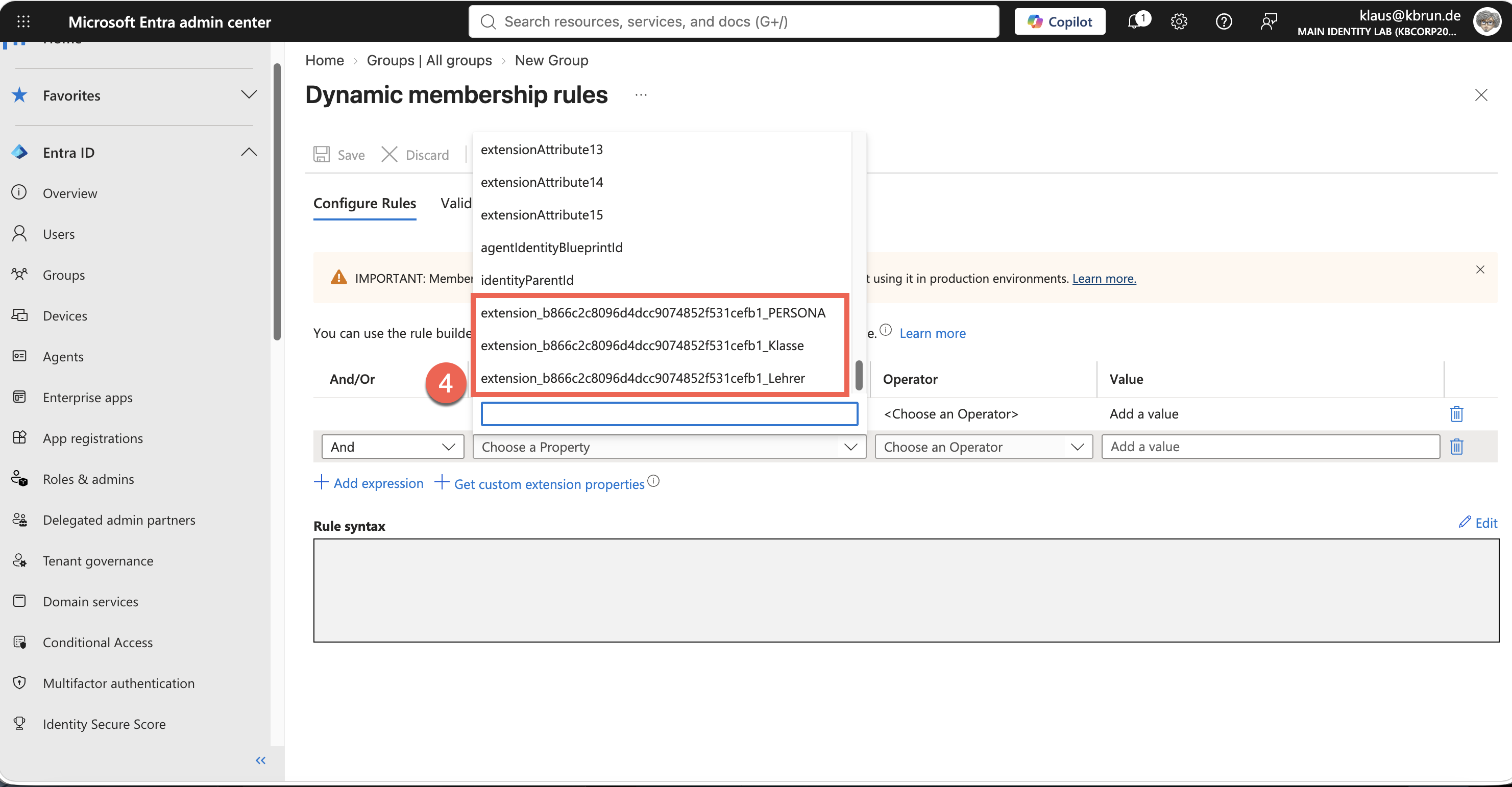
The actual attribute name contains the App ID of the owning Application.
It looks similar to this:
extension_<AppId>_SchoolClass
The value can then be stored directly on the user object:
PATCH https://graph.microsoft.com/v1.0/users/{user-id}
Content-Type: application/json

{
  "extension_<AppId>_SchoolClass": "8a"
}
Compared to extensionAttribute1 through extensionAttribute15, we now have a descriptive attribute name.
Using Directory Extensions with Dynamic Groups
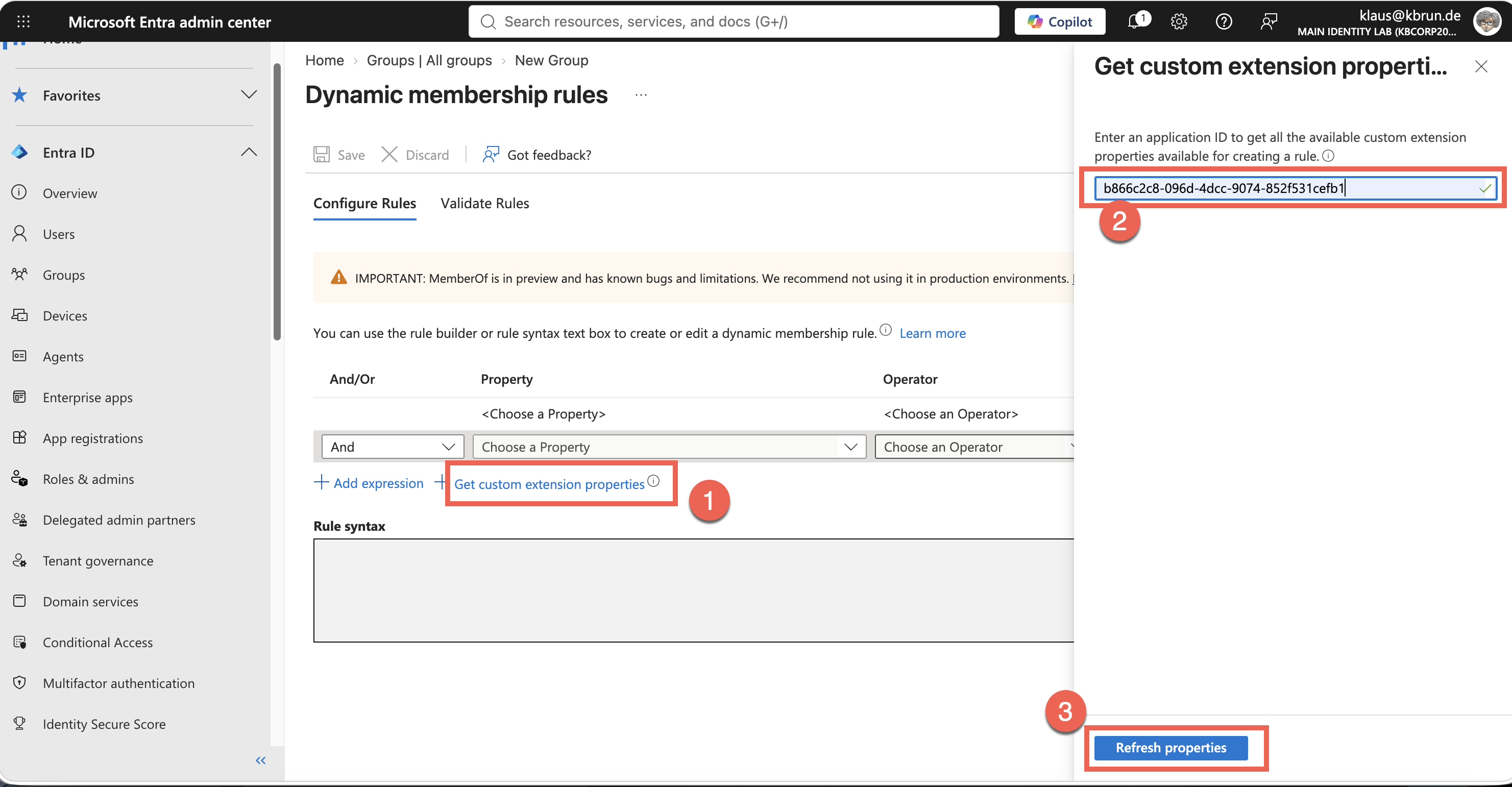
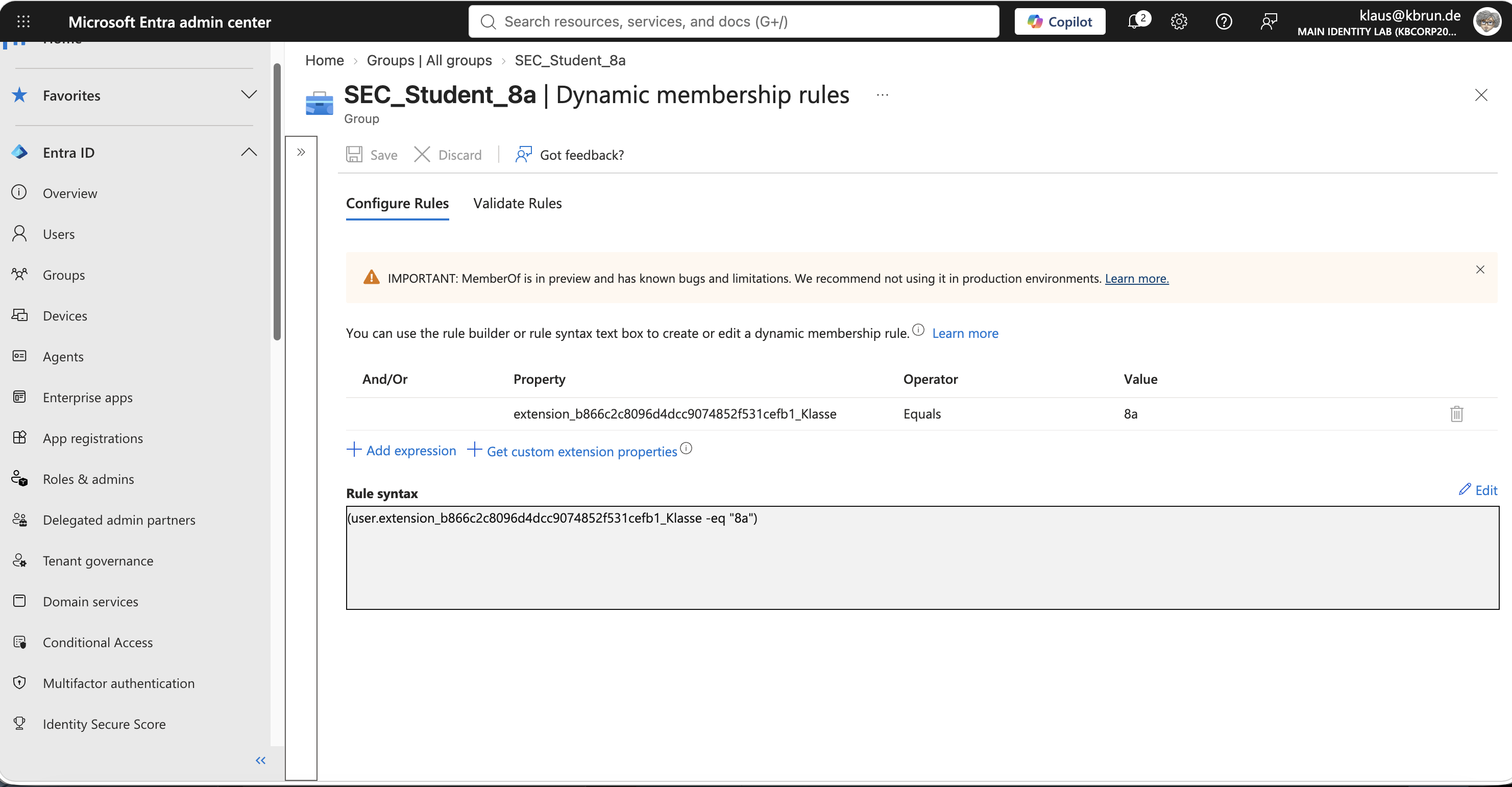
Directory Extensions can also be used in dynamic group membership rules.
For example:
user.extension_<AppId>_SchoolClass -eq "8a"
This gives us a simple model:
User
 │
 └── SchoolClass = 8a
              │
              ▼
       Dynamic Group
              │
              ▼
       Students-Class-8a
For user classification and subsequent automation, this is a very useful combination.
The screenshots below show how to use Directory Extensions with a dynamic group.
The Owner Application
There is one important dependency you need to understand when using Directory Extensions.
The extension definition belongs to an App Registration.
Microsoft Graph exposes the extension properties below the corresponding Application:
/applications/{application-id}/extensionProperties
This means the Application is not only required when creating the extension. It actually owns the extension definition.
This raises an important question:
What happens if somebody deletes this App Registration?
I tested exactly this scenario in my lab.
Lab Test: Deleting the Owner Application
My test environment consisted of:
- One App Registration owning the Directory Extensions
- A Directory Extension called
Klasse - One user with
Klasse = 8a - A dynamic group based on this attribute
The dynamic membership rule used:
user.extension_<AppId>_Klasse -eq "8a"
Everything worked as expected.
I then deleted the App Registration.
What Happened?
The result was quite interesting:
- Existing attribute values remained on the users.
- The user remained a member of the dynamic group.
- When creating another dynamic group, the extension properties could still be resolved after providing the App ID.
- Writing the same Directory Extension through Microsoft Graph no longer worked.
The last point is the important one.
Deleting the owner Application does not necessarily result in an immediately visible outage.
Existing values can continue to have an effect and existing dynamic group memberships continue to work.
However, the attributes can no longer be maintained normally.
Microsoft describes the Directory Extensions and their data as undiscoverable after the owner Application is deleted. In practice, this does not mean that the existing values immediately disappear from all user objects.
This makes the issue somewhat tricky:
Everything may continue to look fine. You might only notice the missing owner Application when the next attempt to write an attribute fails.
During my test, the deleted Application was still in its soft-deleted state. I did not test the behavior after permanently deleting the Application.
Recovery
A deleted App Registration is initially soft deleted and can be restored during the applicable recovery period.
This is particularly important for an Application that owns Directory Extensions.
Simply creating another App Registration with the same display name is not a replacement. The new Application receives a different App ID, which would also result in different Directory Extension names.
Therefore, restoring the original Application is the important recovery path.
Protecting the Owner Application
If Directory Extensions are used in production, I would use a dedicated App Registration for them.
For example:
DO NOT DELETE - Entra Directory Extension Schema
The Application does not need to represent an actual business application. Its purpose can simply be to own the Directory Extension definitions.
I would also implement a few additional safeguards:
- Do not assign unnecessary owners
- Make privileged administrative roles eligible through PIM where possible
- Use a clear and warning display name
- Document both the Object ID and Application ID
- Document the defined Directory Extensions
- Monitor changes to and especially deletion of the Application
Unlike Azure resources, App Registrations do not support an Azure Resource Manager CanNotDelete resource lock.
Protection therefore has to come from permissions, governance, documentation, and monitoring.
Monitoring Deletion of the Owner Application
Changes to App Registrations are recorded in the Entra audit logs.
If the audit logs are sent to a Log Analytics workspace, we can specifically monitor the owner Application.
Deleting an Application generates an event such as:
ActivityDisplayName = "Delete application"
The Object ID of the deleted Application can be found in TargetResources.
The following KQL query can be used to identify the deletion of our specific owner Application:
AuditLogs
| where ActivityDisplayName == "Delete application"
| mv-expand TargetResources
| where tostring(TargetResources.id) == "<Object-ID of the owner application>"
This query can be used as the basis for an Azure Monitor Alert Rule.
If the query returns a result, an Action Group can, for example, send an email notification to the administrators.
I described the general setup of Alert Rules and Action Groups in my article:
Zero Trust Monitoring – Monitoring Entra ID with Log Analytics
Advantages
- Descriptive attribute names
- Not limited to the predefined 15 attributes
- Typed attributes
- Supported by dynamic groups
- Well suited for user classification and automation
Disadvantages
- The extension definition depends on an App Registration
- The owner Application needs to be protected and documented
- More technical complexity than using the existing extension attributes
What About Custom Security Attributes?
When looking for custom attributes in Entra ID, you will probably also come across Custom Security Attributes.
At first glance, they look very attractive.
For example, we could create an attribute set called:
Education
and define attributes such as:
Education
 ├── School
 ├── SchoolClass
 └── SchoolYear
One major advantage is their dedicated permission model.
Entra ID provides specific roles for defining and assigning Custom Security Attributes. This allows much more granular control over who can read or modify these attributes.
This makes them particularly interesting for security and authorization scenarios.
However, there is currently one major limitation for our use case:
Custom Security Attributes cannot be used in dynamic Entra ID group membership rules.
Therefore:
SchoolClass = 8a
cannot currently be used to automatically populate a dynamic group such as:
Students-Class-8a
For the scenario discussed in this article, this makes Custom Security Attributes less suitable.
If Microsoft adds support for them in dynamic membership rules in the future, this would definitely be worth reevaluating.
What About Schema Extensions?
Microsoft Graph also provides Schema Extensions.
Schema Extensions allow applications to extend Microsoft Graph resources with their own structured data model. They support defined properties, different Graph resource types, and their own lifecycle with states such as InDevelopment, Available, and Deprecated.
I intentionally do not cover Schema Extensions in detail in this article.
From my perspective, they are more relevant for application developers who need to extend the Microsoft Graph data model for an application than for the administrative use case discussed here: adding a few additional attributes to Entra ID users.
There is another reason.
Once a Schema Extension has been published, changes to the schema are restricted. I did not want to create persistent schema definitions in my tenant just for this article.
Since I have not tested the complete Schema Extension lifecycle myself, I prefer to mention the option rather than describe behavior I have not validated in my own environment.
For technical details, refer to the Microsoft documentation:
Microsoft Graph extensibility overview
Comparing the Options
| Property | Extension Attributes 1–15 | Directory Extensions | Custom Security Attributes |
|---|---|---|---|
| Already available | Yes | No | No |
| Descriptive names | No | Yes | Yes |
| Define your own attributes | No | Yes | Yes |
| Limited to 15 attributes | Yes | No | No |
| Typed attributes | String | Yes | Yes |
| Owner App required | No | Yes | No |
| Dynamic Groups | Yes | Yes | No |
| Dedicated RBAC model | No | No | Yes |
| Complexity | Low | Medium | Medium |
| User classification | Good | Very good | Limited for this scenario |
Which Option Would I Use?
There is no single answer that fits every environment.
If I only need a few additional values and have good documentation, I would not rule out the existing Extension Attributes.
This is simple:
extensionAttribute2 = "8a"
It works, dynamic groups support it, and there is no additional infrastructure to maintain.
The main disadvantage is that nobody can tell from the attribute name what extensionAttribute2 actually means.
For a more structured and long-term attribute model, I prefer Directory Extensions:
extension_<AppId>_SchoolClass = "8a"
They provide descriptive names while still supporting dynamic groups.
The dependency on the owner Application is a disadvantage, but it can be managed with a dedicated App Registration, restricted administrative access, documentation, recovery planning, and monitoring.
Custom Security Attributes are particularly interesting when security and authorization are the main requirements. For classifications that need to drive dynamic group membership, however, the missing support for dynamic membership rules is currently a significant limitation.
Conclusion
Adding an attribute to a user may initially look like a small detail in an identity design.
In practice, these attributes can quickly become the foundation for automation.
A simple value such as:
SchoolClass = "8a"
may eventually determine group memberships, application assignments, or other automated processes.
The question should therefore not only be:
Where can I technically store this value?
You should also consider:
- Is the attribute understandable to other administrators?
- Who can modify it?
- Can it be used with dynamic groups?
- What technical dependencies does it introduce?
- How is it documented?
- What happens if something is accidentally deleted?
- Can the underlying infrastructure be monitored?
For user classifications that need to drive dynamic groups, the two options I currently find most useful are:
Extension Attributes
        │
        ├── simple
        ├── already available
        ├── dynamic groups
        └── non-descriptive names

Directory Extensions
        │
        ├── descriptive names
        ├── flexible
        ├── dynamic groups
        └── owner Application must be protected
Which one is the better choice depends on whether simplicity or a clean and extensible attribute model is more important for your environment.
Cover image is downloaded from Magnific